Azure Zero Trust Network Setup Guide
Overview
Zero Trust is a security model built on the principle "never trust, always verify." Every request — regardless of origin — is authenticated, authorized, and encrypted before access is granted. This guide walks through setting up a Zero Trust network architecture on Azure using four key services:
- Azure Traffic Manager — DNS-based global traffic routing
- Azure Application Gateway (with WAF) — Layer 7 load balancing and web application firewall
- Azure Firewall — Managed network-layer firewall for east-west and north-south traffic
- Azure Firewall Premium — Advanced threat protection with TLS inspection and IDPS
Official Reference: Microsoft Zero Trust deployment guide
Architecture Diagram
The diagram below shows how traffic flows through the Zero Trust network stack. (View full SVG diagram)
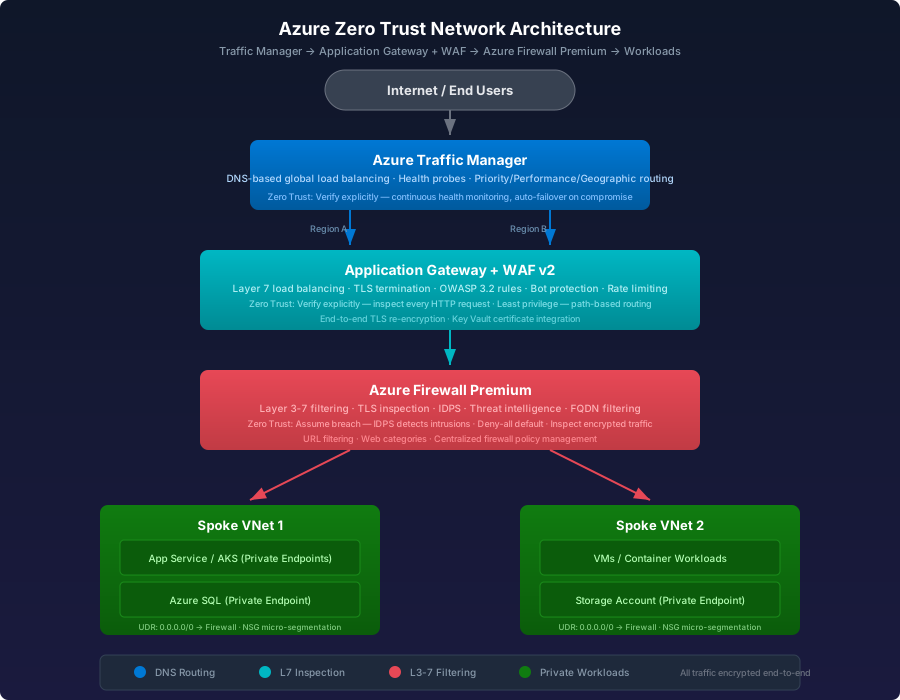
┌─────────────────────────────────────────────────────────────────────────────┐
│                          INTERNET / END USERS                               │
└──────────────────────────────────┬──────────────────────────────────────────┘
                                   │
                                   ▼
              ┌─────────────────────────────────────────┐
              │       AZURE TRAFFIC MANAGER              │
              │   (DNS-based global load balancing)      │
              │                                         │
              │  • Health probes per region              │
              │  • Priority / Weighted / Geographic      │
              │  • Failover routing                      │
              └────────────┬───────────────┬────────────┘
                           │               │
                    Region A               Region B
                           │               │
                           ▼               ▼
              ┌────────────────────────────────────────┐
              │     APPLICATION GATEWAY + WAF v2        │
              │      (Layer 7 — per region)             │
              │                                        │
              │  • SSL/TLS termination                 │
              │  • OWASP Core Rule Set 3.2             │
              │  • Path-based routing                  │
              │  • Custom WAF policies                 │
              │  • End-to-end TLS re-encryption        │
              └────────────────────┬───────────────────┘
                                   │
                                   ▼
              ┌────────────────────────────────────────┐
              │       AZURE FIREWALL (PREMIUM)          │
              │    (Layer 3-7 — hub VNet)               │
              │                                        │
              │  • TLS inspection (decrypt/inspect)    │
              │  • IDPS (signature-based detection)    │
              │  • URL filtering & web categories      │
              │  • Threat intelligence feed            │
              │  • Network & application rules         │
              └────────────────────┬───────────────────┘
                                   │
                          ┌────────┴────────┐
                          │                 │
                          ▼                 ▼
              ┌──────────────────┐ ┌──────────────────┐
              │   Spoke VNet 1   │ │   Spoke VNet 2   │
              │  ┌────────────┐  │ │  ┌────────────┐  │
              │  │ App Service │  │ │  │  AKS / VMs │  │
              │  │ Environment │  │ │  │  Workloads │  │
              │  └────────────┘  │ │  └────────────┘  │
              │  ┌────────────┐  │ │  ┌────────────┐  │
              │  │  Azure SQL  │  │ │  │  Storage   │  │
              │  │  (Private)  │  │ │  │ (Private)  │  │
              │  └────────────┘  │ │  └────────────┘  │
              └──────────────────┘ └──────────────────┘
Traffic Flow Summary:
- User DNS query resolves via Traffic Manager → routes to nearest healthy region
- Application Gateway terminates TLS, inspects HTTP with WAF rules, re-encrypts
- Azure Firewall Premium inspects traffic with IDPS and TLS inspection
- Traffic reaches workloads in spoke VNets via private endpoints
Zero Trust Principles Applied
Each service enforces specific Zero Trust principles:
Part 1: Azure Traffic Manager
Traffic Manager provides DNS-level routing across regions. It does not see or process actual traffic — it directs users to the closest or healthiest endpoint.
Official Docs: Azure Traffic Manager overview
1.1 Create a Traffic Manager Profile
Portal:
- Go to Azure Portal → Create a resource → search Traffic Manager profile
- Configure:
- Name:
zt-traffic-manager(becomeszt-traffic-manager.trafficmanager.net) - Routing method:
Priority(for active-passive failover) orPerformance(for latency-based) - Resource group: your Zero Trust resource group
- Subscription: select your subscription
- Name:
Azure CLI:
# Create resource group
az group create \
  --name rg-zerotrust-network \
  --location eastus

# Create Traffic Manager profile with priority routing
az network traffic-manager profile create \
  --name zt-traffic-manager \
  --resource-group rg-zerotrust-network \
  --routing-method Priority \
  --unique-dns-name zt-traffic-manager \
  --monitor-protocol HTTPS \
  --monitor-port 443 \
  --monitor-path "/health" \
  --ttl 30
1.2 Configure Health Probes (Zero Trust: Verify Explicitly)
Health probes continuously verify that endpoints are alive and responding correctly. This is critical for Zero Trust — never assume an endpoint is healthy.
# Health probe settings are set during profile creation above.
# Key parameters:
#   --monitor-protocol HTTPS     (always use HTTPS, never HTTP)
#   --monitor-port 443
#   --monitor-path "/health"     (dedicated health endpoint)
#   --ttl 30                     (check every 30 seconds)
Best Practice Checklist:
- Always use HTTPS for probes (never HTTP)
- Set a dedicated
/healthendpoint that validates backend dependencies - Set TTL to 30 seconds or less for fast failover
- Enable Fast Failover settings: probing interval = 10s, tolerated failures = 3
1.3 Add Endpoints
Add your Application Gateway public IPs as endpoints:
# Add primary region endpoint (Priority 1)
az network traffic-manager endpoint create \
  --name endpoint-eastus \
  --profile-name zt-traffic-manager \
  --resource-group rg-zerotrust-network \
  --type azureEndpoints \
  --target-resource-id /subscriptions/{sub-id}/resourceGroups/{rg}/providers/Microsoft.Network/publicIPAddresses/appgw-pip-eastus \
  --priority 1

# Add secondary region endpoint (Priority 2 — failover)
az network traffic-manager endpoint create \
  --name endpoint-westus \
  --profile-name zt-traffic-manager \
  --resource-group rg-zerotrust-network \
  --type azureEndpoints \
  --target-resource-id /subscriptions/{sub-id}/resourceGroups/{rg}/providers/Microsoft.Network/publicIPAddresses/appgw-pip-westus \
  --priority 2
1.4 Routing Method Comparison
1.5 Zero Trust Hardening for Traffic Manager
- Disable HTTP endpoints — only allow HTTPS-monitored endpoints
- Use nested profiles for multi-layer routing (geographic → performance)
- Enable diagnostic logging → route to Log Analytics workspace
- Lock the resource with Azure Resource Lock to prevent accidental deletion
- RBAC: Grant
Traffic Manager Contributoronly to network admins
# Enable diagnostic logging
az monitor diagnostic-settings create \
  --name zt-tm-diagnostics \
  --resource /subscriptions/{sub-id}/resourceGroups/rg-zerotrust-network/providers/Microsoft.Network/trafficManagerProfiles/zt-traffic-manager \
  --workspace /subscriptions/{sub-id}/resourceGroups/{rg}/providers/Microsoft.OperationalInsights/workspaces/{workspace-name} \
  --logs '[{"category": "ProbeHealthStatusEvents", "enabled": true}]'
Part 2: Azure Application Gateway with WAF v2
Application Gateway is a Layer 7 (HTTP/HTTPS) load balancer with an integrated Web Application Firewall (WAF). It sits in front of your workloads and inspects every request.
Official Docs: Application Gateway overview
Zero Trust Reference: Apply Zero Trust to Azure networking — Application Gateway
2.1 Prerequisites
Before creating the Application Gateway:
- Dedicated subnet: Application Gateway requires its own subnet (minimum /24 recommended)
- Public IP: Standard SKU, static allocation
- WAF v2 SKU: Required for Zero Trust (Standard SKU does not include WAF)
# Create the VNet and Application Gateway subnet
az network vnet create \
  --name vnet-hub-eastus \
  --resource-group rg-zerotrust-network \
  --location eastus \
  --address-prefixes 10.0.0.0/16

az network vnet subnet create \
  --name snet-appgw \
  --resource-group rg-zerotrust-network \
  --vnet-name vnet-hub-eastus \
  --address-prefixes 10.0.1.0/24

# Create static public IP
az network public-ip create \
  --name appgw-pip-eastus \
  --resource-group rg-zerotrust-network \
  --location eastus \
  --sku Standard \
  --allocation-method Static
2.2 Create the Application Gateway (WAF v2)
az network application-gateway create \
  --name appgw-zerotrust-eastus \
  --resource-group rg-zerotrust-network \
  --location eastus \
  --sku WAF_v2 \
  --capacity 2 \
  --vnet-name vnet-hub-eastus \
  --subnet snet-appgw \
  --public-ip-address appgw-pip-eastus \
  --http-settings-cookie-based-affinity Disabled \
  --frontend-port 443 \
  --http-settings-port 443 \
  --http-settings-protocol Https \
  --priority 100
2.3 Configure TLS/SSL (Zero Trust: Encrypt Everything)
Never terminate TLS without re-encrypting to backend. Use end-to-end TLS:
# Upload TLS certificate for frontend
az network application-gateway ssl-cert create \
  --gateway-name appgw-zerotrust-eastus \
  --resource-group rg-zerotrust-network \
  --name frontend-cert \
  --cert-file ./certs/frontend.pfx \
  --cert-password "{your-cert-password}"

# Configure backend HTTPS settings (re-encrypt to backend)
az network application-gateway http-settings update \
  --gateway-name appgw-zerotrust-eastus \
  --resource-group rg-zerotrust-network \
  --name appGatewayBackendHttpSettings \
  --protocol Https \
  --port 443 \
  --host-name-from-backend-pool true
TLS Best Practices for Zero Trust:
- Use TLS 1.2 minimum (TLS 1.3 preferred)
- Store certificates in Azure Key Vault and reference them from App Gateway
- Enable Key Vault integration for automatic certificate rotation
- Use managed identity for App Gateway to access Key Vault
# Create managed identity for App Gateway
az identity create \
  --name id-appgw-zerotrust \
  --resource-group rg-zerotrust-network

# Grant Key Vault access to the managed identity
az keyvault set-policy \
  --name kv-zerotrust \
  --object-id {managed-identity-principal-id} \
  --secret-permissions get list
2.4 Configure WAF Policy (Zero Trust: Verify Explicitly)
The WAF inspects every HTTP request. In Zero Trust, the WAF is your first line of defence at Layer 7.
# Create WAF policy in Prevention mode
az network application-gateway waf-policy create \
  --name waf-policy-zerotrust \
  --resource-group rg-zerotrust-network \
  --location eastus

# Configure managed rule set (OWASP 3.2 + Bot Manager)
az network application-gateway waf-policy managed-rule rule-set add \
  --policy-name waf-policy-zerotrust \
  --resource-group rg-zerotrust-network \
  --type OWASP \
  --version 3.2

az network application-gateway waf-policy managed-rule rule-set add \
  --policy-name waf-policy-zerotrust \
  --resource-group rg-zerotrust-network \
  --type Microsoft_BotManagerRuleSet \
  --version 1.0

# Set WAF to Prevention mode (blocks attacks, not just detects)
az network application-gateway waf-policy policy-setting update \
  --policy-name waf-policy-zerotrust \
  --resource-group rg-zerotrust-network \
  --state Enabled \
  --mode Prevention \
  --max-request-body-size-kb 128 \
  --file-upload-limit-mb 100 \
  --request-body-check true

# Associate WAF policy with Application Gateway
az network application-gateway update \
  --name appgw-zerotrust-eastus \
  --resource-group rg-zerotrust-network \
  --waf-policy waf-policy-zerotrust
Docs: Configure WAF policies
2.5 WAF Custom Rules (Zero Trust: Assume Breach)
Add custom rules to block known attack patterns:
# Block requests from specific geolocations
az network application-gateway waf-policy custom-rule create \
  --policy-name waf-policy-zerotrust \
  --resource-group rg-zerotrust-network \
  --name GeoBlock \
  --priority 10 \
  --rule-type MatchRule \
  --action Block

# Rate limiting rule — block IPs making more than 100 requests per minute
az network application-gateway waf-policy custom-rule create \
  --policy-name waf-policy-zerotrust \
  --resource-group rg-zerotrust-network \
  --name RateLimit \
  --priority 20 \
  --rule-type RateLimitRule \
  --rate-limit-threshold 100 \
  --rate-limit-duration FiveMins \
  --action Block
Docs: WAF custom rules
2.6 Path-Based Routing (Zero Trust: Least Privilege)
Route traffic to specific backend pools based on URL path. This limits each backend to only the traffic it should receive:
# Create backend pools for different services
az network application-gateway address-pool create \
  --gateway-name appgw-zerotrust-eastus \
  --resource-group rg-zerotrust-network \
  --name pool-api \
  --servers 10.0.10.4 10.0.10.5

az network application-gateway address-pool create \
  --gateway-name appgw-zerotrust-eastus \
  --resource-group rg-zerotrust-network \
  --name pool-web \
  --servers 10.0.11.4 10.0.11.5

# Create URL path map
az network application-gateway url-path-map create \
  --gateway-name appgw-zerotrust-eastus \
  --resource-group rg-zerotrust-network \
  --name url-path-map \
  --paths "/api/*" \
  --address-pool pool-api \
  --default-address-pool pool-web \
  --http-settings appGatewayBackendHttpSettings \
  --default-http-settings appGatewayBackendHttpSettings
2.7 Enable Diagnostics and Logging
# Enable full diagnostic logging for Application Gateway
az monitor diagnostic-settings create \
  --name appgw-diagnostics \
  --resource /subscriptions/{sub-id}/resourceGroups/rg-zerotrust-network/providers/Microsoft.Network/applicationGateways/appgw-zerotrust-eastus \
  --workspace /subscriptions/{sub-id}/resourceGroups/{rg}/providers/Microsoft.OperationalInsights/workspaces/{workspace-name} \
  --logs '[
    {"category": "ApplicationGatewayAccessLog", "enabled": true},
    {"category": "ApplicationGatewayFirewallLog", "enabled": true},
    {"category": "ApplicationGatewayPerformanceLog", "enabled": true}
  ]' \
  --metrics '[{"category": "AllMetrics", "enabled": true}]'
2.8 Application Gateway Zero Trust Checklist
- WAF v2 SKU with Prevention mode enabled
- OWASP Core Rule Set 3.2 active
- Bot Manager rule set enabled
- End-to-end TLS — re-encrypt traffic to backends
- TLS certificates stored in Key Vault with managed identity
- TLS 1.2 minimum policy configured
- Custom rate limiting rules in place
- Path-based routing isolates backends (least privilege)
- Diagnostic logs flowing to Log Analytics
- Request body inspection enabled
- Private backend pools only (no public IPs on backends)
Part 3: Azure Firewall (Standard and Premium)
Azure Firewall is a managed, cloud-native network security service. It filters traffic at Layers 3–7 and serves as the central enforcement point in a hub-and-spoke network. Firewall Premium adds TLS inspection and IDPS for full Zero Trust traffic inspection.
Official Docs: Azure Firewall overview
Zero Trust Reference: Apply Zero Trust to Azure Firewall
Standard vs Premium — Which Do You Need?
Recommendation: For true Zero Trust, use Azure Firewall Premium. TLS inspection and IDPS are essential — without them, encrypted malicious traffic passes through uninspected.
3.1 Create the Firewall Subnet and Public IP
Azure Firewall requires a dedicated subnet named exactly AzureFirewallSubnet:
# Create the mandatory firewall subnet (minimum /26)
az network vnet subnet create \
  --name AzureFirewallSubnet \
  --resource-group rg-zerotrust-network \
  --vnet-name vnet-hub-eastus \
  --address-prefixes 10.0.2.0/26

# Create public IP for the firewall
az network public-ip create \
  --name fw-pip-eastus \
  --resource-group rg-zerotrust-network \
  --location eastus \
  --sku Standard \
  --allocation-method Static
3.2 Create a Firewall Policy (Premium)
Firewall Policy is the recommended way to manage rules. It supports inheritance and can be shared across firewalls:
# Create Premium firewall policy
az network firewall policy create \
  --name fw-policy-zerotrust \
  --resource-group rg-zerotrust-network \
  --location eastus \
  --sku Premium \
  --threat-intel-mode Deny \
  --intrusion-detection-mode Alert

# Enable IDPS in Alert & Deny mode
az network firewall policy intrusion-detection add \
  --policy-name fw-policy-zerotrust \
  --resource-group rg-zerotrust-network \
  --mode "Alert and Deny"
Docs: Firewall Policy overview
3.3 Configure TLS Inspection (Premium Only)
TLS inspection is the cornerstone of Zero Trust at the network layer. Without it, the firewall cannot inspect encrypted traffic.
Prerequisites:
- An intermediate CA certificate stored in Azure Key Vault
- Azure Firewall's managed identity must have access to Key Vault
# Create managed identity for the firewall
az identity create \
  --name id-fw-zerotrust \
  --resource-group rg-zerotrust-network

# Grant Key Vault access
az keyvault set-policy \
  --name kv-zerotrust \
  --object-id {firewall-managed-identity-principal-id} \
  --certificate-permissions get list \
  --secret-permissions get list

# Configure TLS inspection on the firewall policy
az network firewall policy update \
  --name fw-policy-zerotrust \
  --resource-group rg-zerotrust-network \
  --key-vault-secret-id https://kv-zerotrust.vault.azure.net/secrets/intermediate-ca \
  --certificate-name intermediate-ca \
  --identity-type UserAssigned \
  --user-assigned-identity id-fw-zerotrust
TLS Inspection Flow:
Client                Azure Firewall Premium              Backend Server
  │                          │                                 │
  │──── TLS handshake ──────▶│                                 │
  │◀─── FW cert (signed by   │                                 │
  │     intermediate CA) ────│                                 │
  │                          │                                 │
  │==== Encrypted session ===│                                 │
  │     (client ↔ firewall)  │                                 │
  │                          │──── New TLS handshake ─────────▶│
  │                          │◀─── Server cert ────────────────│
  │                          │==== Encrypted session ==========│
  │                          │     (firewall ↔ backend)        │
  │                          │                                 │
  │     Firewall decrypts,   │                                 │
  │     inspects with IDPS,  │                                 │
  │     re-encrypts          │                                 │
3.4 Create the Azure Firewall (Premium)
az network firewall create \
  --name fw-zerotrust-eastus \
  --resource-group rg-zerotrust-network \
  --location eastus \
  --sku AZFW_VNet \
  --tier Premium \
  --vnet-name vnet-hub-eastus \
  --public-ip fw-pip-eastus \
  --firewall-policy fw-policy-zerotrust
3.5 Configure Network Rules (Zero Trust: Deny All by Default)
Azure Firewall uses deny-all by default. You must explicitly allow traffic:
# Create a rule collection group
az network firewall policy rule-collection-group create \
  --name DefaultNetworkRuleGroup \
  --policy-name fw-policy-zerotrust \
  --resource-group rg-zerotrust-network \
  --priority 200

# Allow DNS traffic to Azure DNS only
az network firewall policy rule-collection-group collection add-filter-collection \
  --rule-collection-group-name DefaultNetworkRuleGroup \
  --policy-name fw-policy-zerotrust \
  --resource-group rg-zerotrust-network \
  --name AllowDNS \
  --collection-priority 100 \
  --rule-type NetworkRule \
  --action Allow \
  --rule-name AllowAzureDNS \
  --source-addresses "10.0.0.0/16" \
  --destination-addresses "168.63.129.16" \
  --destination-ports 53 \
  --ip-protocols UDP TCP

# Allow HTTPS to specific backend subnets only
az network firewall policy rule-collection-group collection add-filter-collection \
  --rule-collection-group-name DefaultNetworkRuleGroup \
  --policy-name fw-policy-zerotrust \
  --resource-group rg-zerotrust-network \
  --name AllowAppTraffic \
  --collection-priority 200 \
  --rule-type NetworkRule \
  --action Allow \
  --rule-name AllowHTTPS \
  --source-addresses "10.0.1.0/24" \
  --destination-addresses "10.0.10.0/24" "10.0.11.0/24" \
  --destination-ports 443 \
  --ip-protocols TCP
3.6 Configure Application Rules (FQDN Filtering)
Application rules allow outbound traffic only to approved FQDNs:
# Create application rule collection group
az network firewall policy rule-collection-group create \
  --name DefaultApplicationRuleGroup \
  --policy-name fw-policy-zerotrust \
  --resource-group rg-zerotrust-network \
  --priority 300

# Allow outbound to Microsoft services only
az network firewall policy rule-collection-group collection add-filter-collection \
  --rule-collection-group-name DefaultApplicationRuleGroup \
  --policy-name fw-policy-zerotrust \
  --resource-group rg-zerotrust-network \
  --name AllowMicrosoft \
  --collection-priority 100 \
  --rule-type ApplicationRule \
  --action Allow \
  --rule-name AllowAzureServices \
  --source-addresses "10.0.0.0/16" \
  --protocols Https=443 \
  --fqdn-tags AzureKubernetesService WindowsUpdate

# Allow specific external FQDNs
az network firewall policy rule-collection-group collection add-filter-collection \
  --rule-collection-group-name DefaultApplicationRuleGroup \
  --policy-name fw-policy-zerotrust \
  --resource-group rg-zerotrust-network \
  --name AllowSpecificFQDNs \
  --collection-priority 200 \
  --rule-type ApplicationRule \
  --action Allow \
  --rule-name AllowGitHub \
  --source-addresses "10.0.0.0/16" \
  --protocols Https=443 \
  --target-fqdns "github.com" "*.github.com" "*.githubusercontent.com"
3.7 Configure IDPS (Premium — Zero Trust: Assume Breach)
The Intrusion Detection and Prevention System inspects traffic for known attack signatures:
# Set IDPS to Alert and Deny mode
az network firewall policy intrusion-detection add \
  --policy-name fw-policy-zerotrust \
  --resource-group rg-zerotrust-network \
  --mode "Alert and Deny"

# Add signature overrides for critical threats
# (set high-severity signatures to Deny)
az network firewall policy intrusion-detection add \
  --policy-name fw-policy-zerotrust \
  --resource-group rg-zerotrust-network \
  --signature-id 2024897 \
  --mode Deny

# Bypass IDPS for trusted internal traffic (optional, use sparingly)
az network firewall policy intrusion-detection add \
  --policy-name fw-policy-zerotrust \
  --resource-group rg-zerotrust-network \
  --bypass-rule-name TrustedMonitoring \
  --protocol TCP \
  --source-addresses "10.0.50.0/24" \
  --destination-addresses "10.0.60.0/24" \
  --destination-ports 9090
Docs: Azure Firewall IDPS
3.8 Route Tables — Force Traffic Through Firewall
All spoke VNet traffic must route through the firewall. Create User Defined Routes (UDRs):
# Get the firewall private IP
FW_PRIVATE_IP=$(az network firewall show \
  --name fw-zerotrust-eastus \
  --resource-group rg-zerotrust-network \
  --query "ipConfigurations[0].privateIPAddress" -o tsv)

# Create route table for spoke subnets
az network route-table create \
  --name rt-spoke-to-firewall \
  --resource-group rg-zerotrust-network \
  --location eastus \
  --disable-bgp-route-propagation true

# Default route → firewall
az network route-table route create \
  --name default-to-firewall \
  --route-table-name rt-spoke-to-firewall \
  --resource-group rg-zerotrust-network \
  --address-prefix 0.0.0.0/0 \
  --next-hop-type VirtualAppliance \
  --next-hop-ip-address $FW_PRIVATE_IP

# Associate route table with spoke subnets
az network vnet subnet update \
  --name snet-workloads \
  --vnet-name vnet-spoke-1 \
  --resource-group rg-zerotrust-network \
  --route-table rt-spoke-to-firewall
3.9 Azure Firewall Zero Trust Checklist
- Premium SKU deployed for TLS inspection and IDPS
- Deny-all default — only explicit allow rules exist
- TLS inspection enabled with intermediate CA from Key Vault
- IDPS set to Alert and Deny mode
- Threat Intelligence set to Deny mode (not just Alert)
- Application rules restrict outbound to approved FQDNs only
- Network rules use specific IP ranges, not
* - UDRs force all spoke traffic through the firewall
- No direct internet access from spoke VNets (all traffic via firewall)
- Diagnostic logs sent to Log Analytics workspace
- Firewall Policy used (not classic rules) for centralized management
- DNS proxy enabled on the firewall for FQDN resolution in network rules
Part 4: Integrating All Services Together
This section covers wiring Traffic Manager, Application Gateway, and Azure Firewall Premium into a cohesive Zero Trust architecture using hub-and-spoke networking.
Official Docs: Hub-spoke network topology
Zero Trust Reference: Secure networks with Zero Trust
4.1 Hub-and-Spoke VNet Architecture
The recommended pattern places the firewall and Application Gateway in the hub VNet, with workloads in peered spoke VNets:
┌──────────────────────────────── Hub VNet (10.0.0.0/16) ────────────────────────────────┐
│                                                                                         │
│   ┌─────────────────────┐    ┌──────────────────────┐    ┌────────────────────┐         │
│   │  AzureFirewallSubnet│    │  snet-appgw           │    │  GatewaySubnet     │         │
│   │  10.0.2.0/26        │    │  10.0.1.0/24          │    │  10.0.3.0/27       │         │
│   │                     │    │                       │    │                    │         │
│   │  ┌───────────────┐  │    │  ┌─────────────────┐  │    │  (VPN/ExpressRoute │         │
│   │  │ Azure Firewall│  │    │  │ App Gateway      │  │    │   if needed)       │         │
│   │  │    Premium     │  │    │  │ + WAF v2         │  │    │                    │         │
│   │  └───────────────┘  │    │  └─────────────────┘  │    └────────────────────┘         │
│   └─────────────────────┘    └──────────────────────┘                                   │
│                                                                                         │
└─────────────────────┬──────────────────────────────────────┬────────────────────────────┘
                      │ VNet Peering                         │ VNet Peering
                      │                                      │
    ┌─────────────────▼──────────────┐     ┌─────────────────▼──────────────┐
    │   Spoke VNet 1 (10.0.10.0/24) │     │   Spoke VNet 2 (10.0.11.0/24) │
    │                                │     │                                │
    │   ┌──────────────────────┐     │     │   ┌──────────────────────┐     │
    │   │  App Service / AKS   │     │     │   │  VMs / Databases     │     │
    │   │  (Private Endpoints) │     │     │   │  (Private Endpoints) │     │
    │   └──────────────────────┘     │     │   └──────────────────────┘     │
    │                                │     │                                │
    │   UDR: 0.0.0.0/0 → Firewall   │     │   UDR: 0.0.0.0/0 → Firewall   │
    └────────────────────────────────┘     └────────────────────────────────┘
4.2 VNet Peering Setup
# Create spoke VNets
az network vnet create \
  --name vnet-spoke-1 \
  --resource-group rg-zerotrust-network \
  --location eastus \
  --address-prefixes 10.0.10.0/24

az network vnet create \
  --name vnet-spoke-2 \
  --resource-group rg-zerotrust-network \
  --location eastus \
  --address-prefixes 10.0.11.0/24

# Peer hub → spoke-1
az network vnet peering create \
  --name hub-to-spoke1 \
  --resource-group rg-zerotrust-network \
  --vnet-name vnet-hub-eastus \
  --remote-vnet vnet-spoke-1 \
  --allow-forwarded-traffic true \
  --allow-gateway-transit true

# Peer spoke-1 → hub
az network vnet peering create \
  --name spoke1-to-hub \
  --resource-group rg-zerotrust-network \
  --vnet-name vnet-spoke-1 \
  --remote-vnet vnet-hub-eastus \
  --allow-forwarded-traffic true \
  --use-remote-gateways false

# Repeat for spoke-2
az network vnet peering create \
  --name hub-to-spoke2 \
  --resource-group rg-zerotrust-network \
  --vnet-name vnet-hub-eastus \
  --remote-vnet vnet-spoke-2 \
  --allow-forwarded-traffic true \
  --allow-gateway-transit true

az network vnet peering create \
  --name spoke2-to-hub \
  --resource-group rg-zerotrust-network \
  --vnet-name vnet-spoke-2 \
  --remote-vnet vnet-hub-eastus \
  --allow-forwarded-traffic true \
  --use-remote-gateways false
4.3 End-to-End Traffic Flow
Here is exactly how a request flows through the entire Zero Trust stack:
Step 1: DNS Resolution
  User browser ──DNS query──▶ Azure Traffic Manager
                              │
                              ├─ Checks health probes for all endpoints
                              ├─ Selects endpoint based on routing method
                              └─ Returns IP of Application Gateway (Region A)

Step 2: Layer 7 Inspection (Application Gateway + WAF)
  User browser ──HTTPS──▶ Application Gateway public IP
                          │
                          ├─ TLS termination (decrypts request)
                          ├─ WAF inspection (OWASP 3.2 rules)
                          ├─ Bot detection (Microsoft Bot Manager)
                          ├─ Rate limit check (custom rules)
                          ├─ Path-based routing decision
                          └─ Re-encrypts → sends to Azure Firewall

Step 3: Network Inspection (Azure Firewall Premium)
  App Gateway ──HTTPS──▶ Azure Firewall (via UDR)
                         │
                         ├─ TLS inspection (decrypt with intermediate CA)
                         ├─ IDPS signature matching
                         ├─ Network rule evaluation (IP/port allow list)
                         ├─ Application rule evaluation (FQDN filtering)
                         ├─ Threat intelligence check
                         └─ Re-encrypts → forwards to backend

Step 4: Backend Processing
  Azure Firewall ──HTTPS──▶ Backend in Spoke VNet
                            │
                            ├─ Private endpoint (no public IP)
                            ├─ NSG on subnet (additional micro-segmentation)
                            └─ Application processes request
4.4 Private Endpoints for Backend Services
Zero Trust requires that backend services have no public internet exposure:
# Create private endpoint for Azure SQL
az network private-endpoint create \
  --name pe-sql-zerotrust \
  --resource-group rg-zerotrust-network \
  --vnet-name vnet-spoke-1 \
  --subnet snet-workloads \
  --private-connection-resource-id /subscriptions/{sub-id}/resourceGroups/{rg}/providers/Microsoft.Sql/servers/{sql-server-name} \
  --group-id sqlServer \
  --connection-name sql-private-connection

# Create private DNS zone for SQL
az network private-dns zone create \
  --name privatelink.database.windows.net \
  --resource-group rg-zerotrust-network

# Link private DNS zone to hub VNet
az network private-dns link vnet create \
  --name link-hub \
  --resource-group rg-zerotrust-network \
  --zone-name privatelink.database.windows.net \
  --virtual-network vnet-hub-eastus \
  --registration-enabled false
Docs: Private endpoints
4.5 Network Security Groups (Micro-segmentation)
NSGs provide an additional layer of micro-segmentation within each subnet:
# Create NSG for workload subnet
az network nsg create \
  --name nsg-workloads \
  --resource-group rg-zerotrust-network \
  --location eastus

# Allow inbound HTTPS from Application Gateway subnet only
az network nsg rule create \
  --nsg-name nsg-workloads \
  --resource-group rg-zerotrust-network \
  --name AllowAppGateway \
  --priority 100 \
  --source-address-prefixes 10.0.1.0/24 \
  --destination-port-ranges 443 \
  --protocol TCP \
  --access Allow \
  --direction Inbound

# Deny all other inbound traffic
az network nsg rule create \
  --nsg-name nsg-workloads \
  --resource-group rg-zerotrust-network \
  --name DenyAllInbound \
  --priority 4096 \
  --source-address-prefixes "*" \
  --destination-port-ranges "*" \
  --protocol "*" \
  --access Deny \
  --direction Inbound

# Associate NSG with subnet
az network vnet subnet update \
  --name snet-workloads \
  --vnet-name vnet-spoke-1 \
  --resource-group rg-zerotrust-network \
  --network-security-group nsg-workloads
Part 5: Monitoring, Logging, and Verification
Zero Trust requires continuous monitoring. Every component must log to a central workspace.
Official Docs: Azure Monitor overview
5.1 Create Log Analytics Workspace
az monitor log-analytics workspace create \
  --workspace-name law-zerotrust \
  --resource-group rg-zerotrust-network \
  --location eastus \
  --retention-time 90
5.2 Enable Diagnostics on All Services
# Get workspace ID
WORKSPACE_ID=$(az monitor log-analytics workspace show \
  --workspace-name law-zerotrust \
  --resource-group rg-zerotrust-network \
  --query id -o tsv)

# Azure Firewall diagnostics
az monitor diagnostic-settings create \
  --name fw-diagnostics \
  --resource /subscriptions/{sub-id}/resourceGroups/rg-zerotrust-network/providers/Microsoft.Network/azureFirewalls/fw-zerotrust-eastus \
  --workspace $WORKSPACE_ID \
  --logs '[
    {"category": "AzureFirewallApplicationRule", "enabled": true},
    {"category": "AzureFirewallNetworkRule", "enabled": true},
    {"category": "AzureFirewallDnsProxy", "enabled": true},
    {"category": "AZFWThreatIntel", "enabled": true},
    {"category": "AZFWIdpsSignature", "enabled": true}
  ]' \
  --metrics '[{"category": "AllMetrics", "enabled": true}]'

# Application Gateway diagnostics (see Part 2, section 2.7)

# Traffic Manager diagnostics (see Part 1, section 1.5)
5.3 KQL Query Reference — Day-to-Day Operations
These queries are designed for daily monitoring, health checks, and operational awareness. Run them in Log Analytics against the workspace receiving your diagnostic logs.
Official Docs: KQL overview · Azure Firewall log schema · Application Gateway log schema
5.3.1 Azure Firewall — Daily Operations
Denied traffic summary (last 24 hours) — check deny-all posture is working:
AzureDiagnostics
| where TimeGenerated > ago(24h)
| where Category in ("AzureFirewallNetworkRule", "AzureFirewallApplicationRule")
| where msg_s contains "Deny"
| parse msg_s with Protocol " request from " SourceIP ":" SourcePort " to " DestIP ":" DestPort ". Action: " Action "." *
| summarize
    DenyCount = count(),
    UniqueSourceIPs = dcount(SourceIP)
    by bin(TimeGenerated, 1h)
| render timechart
Top 20 denied source IPs — spot repeat offenders:
AzureDiagnostics
| where TimeGenerated > ago(24h)
| where Category in ("AzureFirewallNetworkRule", "AzureFirewallApplicationRule")
| where msg_s contains "Deny"
| parse msg_s with * " request from " SourceIP ":" * " to " DestIP ":" DestPort ". Action: " Action "." *
| summarize DenyCount = count() by SourceIP
| top 20 by DenyCount desc
Top allowed outbound FQDNs — verify expected outbound traffic:
AzureDiagnostics
| where TimeGenerated > ago(24h)
| where Category == "AzureFirewallApplicationRule"
| where msg_s contains "Allow"
| parse msg_s with * " to " FQDN ":" * ". Action: Allow." *
| summarize RequestCount = count() by FQDN
| top 30 by RequestCount desc
Firewall throughput by hour — capacity planning:
AzureMetrics
| where TimeGenerated > ago(24h)
| where ResourceType == "AZUREFIREWALLS"
| where MetricName == "Throughput"
| summarize AvgThroughputBps = avg(Average) by bin(TimeGenerated, 1h)
| extend AvgThroughputMbps = round(AvgThroughputBps / 1000000, 2)
| project TimeGenerated, AvgThroughputMbps
| render timechart
SNAT port utilisation — watch for exhaustion (>90% is critical):
AzureMetrics
| where TimeGenerated > ago(24h)
| where ResourceType == "AZUREFIREWALLS"
| where MetricName == "SNATPortUtilization"
| summarize MaxUtilization = max(Maximum), AvgUtilization = avg(Average) by bin(TimeGenerated, 15m)
| render timechart
DNS proxy queries — see what your workloads are resolving:
AzureDiagnostics
| where TimeGenerated > ago(24h)
| where Category == "AzureFirewallDnsProxy"
| parse msg_s with "DNS Request: " ClientIP ":" ClientPort " - " QueryID " " RequestType " " RequestClass " " FQDN ". " Protocol " " SourceSize " " * "NOERROR" *
| summarize QueryCount = count() by FQDN
| top 30 by QueryCount desc
DNS failures — spot resolution problems:
AzureDiagnostics
| where TimeGenerated > ago(24h)
| where Category == "AzureFirewallDnsProxy"
| where msg_s !contains "NOERROR"
| parse msg_s with "DNS Request: " ClientIP ":" ClientPort " - " QueryID " " RequestType " " RequestClass " " FQDN ". " Protocol " " SourceSize " " * ResponseCode *
| summarize FailCount = count() by FQDN, ResponseCode
| order by FailCount desc
5.3.2 Azure Firewall Premium — Threat Detection
IDPS alerts (last 24 hours) — all threat detections:
AzureDiagnostics
| where TimeGenerated > ago(24h)
| where Category == "AZFWIdpsSignature"
| parse msg_s with * "SignatureId: " SignatureId ". " *
| project
    TimeGenerated,
    SignatureId,
    msg_s,
    SourceIP = column_ifexists("SourceIP", ""),
    DestinationIP = column_ifexists("DestinationIP", ""),
    Action = column_ifexists("Action", "")
| order by TimeGenerated desc
IDPS threat summary by severity — daily security posture:
AzureDiagnostics
| where TimeGenerated > ago(24h)
| where Category == "AZFWIdpsSignature"
| parse msg_s with * "Severity: " Severity ". " * "SignatureId: " SignatureId ". " *
| summarize AlertCount = count() by Severity, SignatureId
| order by Severity asc, AlertCount desc
TLS inspection stats — confirm encrypted traffic is being inspected:
AzureDiagnostics
| where TimeGenerated > ago(24h)
| where Category == "AZFWTlsInspection"
| summarize
    InspectedCount = countif(msg_s contains "inspected"),
    BypassedCount = countif(msg_s contains "bypass"),
    FailedCount = countif(msg_s contains "fail")
    by bin(TimeGenerated, 1h)
| render timechart
Threat intelligence hits — traffic to known-bad IPs/domains:
AzureDiagnostics
| where TimeGenerated > ago(7d)
| where Category == "AZFWThreatIntel"
| project TimeGenerated, msg_s
| parse msg_s with * " from " SourceIP ":" SourcePort " to " DestIP ":" DestPort ". Action: " Action ". ThreatIntel: " ThreatDescription
| summarize HitCount = count() by DestIP, ThreatDescription, Action
| order by HitCount desc
5.3.3 Application Gateway + WAF — Daily Operations
Request volume and response codes (last 24 hours):
AzureDiagnostics
| where TimeGenerated > ago(24h)
| where ResourceType == "APPLICATIONGATEWAYS"
| where Category == "ApplicationGatewayAccessLog"
| summarize
    TotalRequests = count(),
    Http2xx = countif(httpStatus_d >= 200 and httpStatus_d < 300),
    Http3xx = countif(httpStatus_d >= 300 and httpStatus_d < 400),
    Http4xx = countif(httpStatus_d >= 400 and httpStatus_d < 500),
    Http5xx = countif(httpStatus_d >= 500)
    by bin(TimeGenerated, 1h)
| render timechart
Backend health and response times:
AzureDiagnostics
| where TimeGenerated > ago(24h)
| where ResourceType == "APPLICATIONGATEWAYS"
| where Category == "ApplicationGatewayAccessLog"
| summarize
    AvgLatencyMs = avg(timeTaken_d * 1000),
    P95LatencyMs = percentile(timeTaken_d * 1000, 95),
    P99LatencyMs = percentile(timeTaken_d * 1000, 99),
    RequestCount = count()
    by bin(TimeGenerated, 15m), serverRouted_s
| order by TimeGenerated desc
Top requested URLs — understand traffic patterns:
AzureDiagnostics
| where TimeGenerated > ago(24h)
| where ResourceType == "APPLICATIONGATEWAYS"
| where Category == "ApplicationGatewayAccessLog"
| summarize RequestCount = count() by requestUri_s
| top 30 by RequestCount desc
WAF blocks summary — what is the WAF catching:
AzureDiagnostics
| where TimeGenerated > ago(24h)
| where ResourceType == "APPLICATIONGATEWAYS"
| where Category == "ApplicationGatewayFirewallLog"
| where action_s == "Blocked"
| summarize BlockCount = count() by ruleId_s, ruleGroup_s, message_s
| order by BlockCount desc
| take 30
WAF blocks by client IP — spot attack sources:
AzureDiagnostics
| where TimeGenerated > ago(24h)
| where ResourceType == "APPLICATIONGATEWAYS"
| where Category == "ApplicationGatewayFirewallLog"
| where action_s == "Blocked"
| summarize
    BlockCount = count(),
    Rules = make_set(ruleId_s)
    by clientIp_s
| order by BlockCount desc
| take 20
WAF matched but allowed (Detection mode) — tune before switching to Prevention:
AzureDiagnostics
| where TimeGenerated > ago(24h)
| where ResourceType == "APPLICATIONGATEWAYS"
| where Category == "ApplicationGatewayFirewallLog"
| where action_s == "Matched"
| summarize MatchCount = count() by ruleId_s, ruleGroup_s, message_s
| order by MatchCount desc
Failed backend connections — backends refusing or timing out:
AzureDiagnostics
| where TimeGenerated > ago(24h)
| where ResourceType == "APPLICATIONGATEWAYS"
| where Category == "ApplicationGatewayAccessLog"
| where httpStatus_d >= 502 and httpStatus_d <= 504
| project TimeGenerated, serverRouted_s, httpStatus_d, timeTaken_d, requestUri_s, clientIP_s
| order by TimeGenerated desc
5.3.4 Traffic Manager — Health and Routing
Endpoint health status over time:
AzureDiagnostics
| where TimeGenerated > ago(7d)
| where ResourceType == "TRAFFICMANAGERPROFILES"
| where Category == "ProbeHealthStatusEvents"
| project TimeGenerated, EndpointName_s, Status_s
| order by TimeGenerated desc
Endpoint state transitions — when did failovers happen:
AzureDiagnostics
| where TimeGenerated > ago(7d)
| where ResourceType == "TRAFFICMANAGERPROFILES"
| where Category == "ProbeHealthStatusEvents"
| sort by TimeGenerated asc
| extend PreviousStatus = prev(Status_s), PreviousEndpoint = prev(EndpointName_s)
| where EndpointName_s == PreviousEndpoint and Status_s != PreviousStatus
| project TimeGenerated, EndpointName_s, FromStatus = PreviousStatus, ToStatus = Status_s
| order by TimeGenerated desc
Endpoints currently degraded or offline:
AzureDiagnostics
| where TimeGenerated > ago(1h)
| where ResourceType == "TRAFFICMANAGERPROFILES"
| where Category == "ProbeHealthStatusEvents"
| where Status_s != "Online"
| summarize LastSeen = max(TimeGenerated) by EndpointName_s, Status_s
| order by LastSeen desc
5.4 KQL Query Reference — Fault Finding and Incident Response
These queries help you diagnose specific problems when something goes wrong. Organised by symptom.
5.4.1 "Users can't reach the site"
Step 1 — Is Traffic Manager returning healthy endpoints?
AzureDiagnostics
| where TimeGenerated > ago(1h)
| where ResourceType == "TRAFFICMANAGERPROFILES"
| where Category == "ProbeHealthStatusEvents"
| summarize arg_max(TimeGenerated, *) by EndpointName_s
| project TimeGenerated, EndpointName_s, Status_s
Step 2 — Is Application Gateway receiving requests?
AzureDiagnostics
| where TimeGenerated > ago(1h)
| where ResourceType == "APPLICATIONGATEWAYS"
| where Category == "ApplicationGatewayAccessLog"
| summarize RequestCount = count() by bin(TimeGenerated, 5m)
| render timechart
Step 3 — Is the firewall dropping legitimate traffic?
AzureDiagnostics
| where TimeGenerated > ago(1h)
| where Category in ("AzureFirewallNetworkRule", "AzureFirewallApplicationRule")
| where msg_s contains "Deny"
| parse msg_s with * " from " SourceIP ":" * " to " DestIP ":" DestPort ". Action: Deny." *
| where SourceIP startswith "10.0.1."  // Application Gateway subnet
| project TimeGenerated, SourceIP, DestIP, DestPort, msg_s
| order by TimeGenerated desc
5.4.2 "Site is slow"
Application Gateway latency breakdown — where is the time spent?
AzureDiagnostics
| where TimeGenerated > ago(4h)
| where ResourceType == "APPLICATIONGATEWAYS"
| where Category == "ApplicationGatewayAccessLog"
| extend
    TotalMs = timeTaken_d * 1000
| summarize
    AvgTotal = round(avg(TotalMs), 1),
    P50 = round(percentile(TotalMs, 50), 1),
    P95 = round(percentile(TotalMs, 95), 1),
    P99 = round(percentile(TotalMs, 99), 1),
    MaxMs = round(max(TotalMs), 1)
    by bin(TimeGenerated, 15m)
| render timechart
Slowest requests — find the problem URLs:
AzureDiagnostics
| where TimeGenerated > ago(4h)
| where ResourceType == "APPLICATIONGATEWAYS"
| where Category == "ApplicationGatewayAccessLog"
| extend TotalMs = timeTaken_d * 1000
| top 50 by TotalMs desc
| project TimeGenerated, requestUri_s, serverRouted_s, httpStatus_d, TotalMs, clientIP_s
Slow backends — which backend pool is the bottleneck?
AzureDiagnostics
| where TimeGenerated > ago(4h)
| where ResourceType == "APPLICATIONGATEWAYS"
| where Category == "ApplicationGatewayAccessLog"
| extend TotalMs = timeTaken_d * 1000
| summarize
    AvgMs = round(avg(TotalMs), 1),
    P95Ms = round(percentile(TotalMs, 95), 1),
    Requests = count()
    by serverRouted_s
| order by P95Ms desc
Firewall processing latency — is the firewall adding delay?
AzureMetrics
| where TimeGenerated > ago(4h)
| where ResourceType == "AZUREFIREWALLS"
| where MetricName == "FirewallLatencyInMs"
| summarize
    AvgLatency = round(avg(Average), 1),
    MaxLatency = round(max(Maximum), 1)
    by bin(TimeGenerated, 5m)
| render timechart
5.4.3 "Getting 502/503/504 errors"
502 Bad Gateway — backend is unreachable or returning invalid responses:
AzureDiagnostics
| where TimeGenerated > ago(4h)
| where ResourceType == "APPLICATIONGATEWAYS"
| where Category == "ApplicationGatewayAccessLog"
| where httpStatus_d == 502
| summarize
    Count502 = count()
    by bin(TimeGenerated, 5m), serverRouted_s
| render timechart
503 Service Unavailable — no healthy backends in the pool:
AzureDiagnostics
| where TimeGenerated > ago(4h)
| where ResourceType == "APPLICATIONGATEWAYS"
| where Category == "ApplicationGatewayAccessLog"
| where httpStatus_d == 503
| project TimeGenerated, requestUri_s, serverRouted_s, serverStatus_s, timeTaken_d
| order by TimeGenerated desc
504 Gateway Timeout — backend took too long to respond:
AzureDiagnostics
| where TimeGenerated > ago(4h)
| where ResourceType == "APPLICATIONGATEWAYS"
| where Category == "ApplicationGatewayAccessLog"
| where httpStatus_d == 504
| project TimeGenerated, requestUri_s, serverRouted_s, timeTaken_d, clientIP_s
| order by TimeGenerated desc
| take 50
Correlate 5xx errors with firewall denies at the same time:
let errors = AzureDiagnostics
| where TimeGenerated > ago(4h)
| where ResourceType == "APPLICATIONGATEWAYS"
| where httpStatus_d >= 500
| summarize ErrorCount = count() by bin(TimeGenerated, 5m);
let denies = AzureDiagnostics
| where TimeGenerated > ago(4h)
| where Category in ("AzureFirewallNetworkRule", "AzureFirewallApplicationRule")
| where msg_s contains "Deny"
| summarize DenyCount = count() by bin(TimeGenerated, 5m);
errors
| join kind=fullouter denies on TimeGenerated
| project TimeGenerated = coalesce(TimeGenerated, TimeGenerated1), ErrorCount = coalesce(ErrorCount, 0), DenyCount = coalesce(DenyCount, 0)
| order by TimeGenerated desc
| render timechart
5.4.4 "WAF is blocking legitimate traffic" (False Positives)
Find the rule that's causing false positives:
AzureDiagnostics
| where TimeGenerated > ago(24h)
| where ResourceType == "APPLICATIONGATEWAYS"
| where Category == "ApplicationGatewayFirewallLog"
| where action_s == "Blocked"
| summarize
    BlockCount = count(),
    SampleURIs = make_set(requestUri_s, 5),
    SampleIPs = make_set(clientIp_s, 5)
    by ruleId_s, ruleGroup_s, message_s
| order by BlockCount desc
Inspect a specific rule's blocks in detail:
// Replace RULE_ID with the rule from the query above
let targetRule = "942130";  // Example: SQL injection rule
AzureDiagnostics
| where TimeGenerated > ago(24h)
| where ResourceType == "APPLICATIONGATEWAYS"
| where Category == "ApplicationGatewayFirewallLog"
| where ruleId_s == targetRule
| project TimeGenerated, clientIp_s, requestUri_s, details_message_s, details_data_s, action_s
| order by TimeGenerated desc
| take 50
Compare blocked vs allowed traffic for a specific URI path:
let targetPath = "/api/";
AzureDiagnostics
| where TimeGenerated > ago(24h)
| where ResourceType == "APPLICATIONGATEWAYS"
| where Category == "ApplicationGatewayFirewallLog"
| where requestUri_s contains targetPath
| summarize Count = count() by action_s, ruleId_s
| order by Count desc
5.4.5 "Firewall is blocking something it shouldn't"
Recent denies from a specific source IP or subnet:
// Replace with the source IP/subnet you're investigating
let sourceSubnet = "10.0.10.";
AzureDiagnostics
| where TimeGenerated > ago(4h)
| where Category in ("AzureFirewallNetworkRule", "AzureFirewallApplicationRule")
| where msg_s contains "Deny"
| where msg_s contains sourceSubnet
| parse msg_s with Protocol " request from " SourceIP ":" SourcePort " to " DestIP ":" DestPort ". Action: Deny." *
| project TimeGenerated, Protocol, SourceIP, SourcePort, DestIP, DestPort
| order by TimeGenerated desc
| take 100
Denied FQDN requests — workload trying to reach a domain not in allow list:
AzureDiagnostics
| where TimeGenerated > ago(4h)
| where Category == "AzureFirewallApplicationRule"
| where msg_s contains "Deny"
| parse msg_s with * " request from " SourceIP ":" SourcePort " to " FQDN ":" DestPort *
| summarize DenyCount = count() by FQDN, SourceIP
| order by DenyCount desc
Check if a specific destination was allowed or denied:
// Replace with the destination you're troubleshooting
let targetDest = "api.example.com";
AzureDiagnostics
| where TimeGenerated > ago(4h)
| where Category in ("AzureFirewallNetworkRule", "AzureFirewallApplicationRule")
| where msg_s contains targetDest
| project TimeGenerated, Category, msg_s
| order by TimeGenerated desc
IDPS false positive investigation — find what triggered a signature:
// Replace with the signature ID from your IDPS alert
let sigId = "2024897";
AzureDiagnostics
| where TimeGenerated > ago(7d)
| where Category == "AZFWIdpsSignature"
| where msg_s contains sigId
| project TimeGenerated, msg_s
| order by TimeGenerated desc
5.4.6 "TLS inspection is breaking something"
TLS inspection failures — certificate errors or handshake failures:
AzureDiagnostics
| where TimeGenerated > ago(24h)
| where Category == "AZFWTlsInspection"
| where msg_s contains "fail" or msg_s contains "error"
| project TimeGenerated, msg_s
| order by TimeGenerated desc
TLS bypassed connections — traffic skipping inspection:
AzureDiagnostics
| where TimeGenerated > ago(24h)
| where Category == "AZFWTlsInspection"
| where msg_s contains "bypass"
| parse msg_s with * "to " DestFQDN ":" *
| summarize BypassCount = count() by DestFQDN
| order by BypassCount desc
5.4.7 "Need to audit who changed what" (Change Tracking)
Firewall rule changes in the last 7 days:
AzureActivity
| where TimeGenerated > ago(7d)
| where ResourceProviderValue == "MICROSOFT.NETWORK"
| where OperationNameValue contains "firewallPolicies" or OperationNameValue contains "azureFirewalls"
| where ActivityStatusValue == "Success"
| project TimeGenerated, Caller, OperationNameValue, ResourceGroup, Properties_d
| order by TimeGenerated desc
Application Gateway configuration changes:
AzureActivity
| where TimeGenerated > ago(7d)
| where ResourceProviderValue == "MICROSOFT.NETWORK"
| where OperationNameValue contains "applicationGateways"
| where ActivityStatusValue == "Success"
| project TimeGenerated, Caller, OperationNameValue, ResourceGroup
| order by TimeGenerated desc
NSG rule changes — someone modified micro-segmentation:
AzureActivity
| where TimeGenerated > ago(7d)
| where ResourceProviderValue == "MICROSOFT.NETWORK"
| where OperationNameValue contains "networkSecurityGroups"
| where ActivityStatusValue == "Success"
| project TimeGenerated, Caller, OperationNameValue, ResourceGroup
| order by TimeGenerated desc
5.4.8 Cross-Service Correlation Queries
End-to-end request tracing — correlate App Gateway, Firewall, and backend:
// Find requests that passed App Gateway but were denied by Firewall
let appGwRequests = AzureDiagnostics
| where TimeGenerated > ago(1h)
| where ResourceType == "APPLICATIONGATEWAYS"
| where Category == "ApplicationGatewayAccessLog"
| where httpStatus_d >= 500
| project AppGwTime = TimeGenerated, clientIP_s, requestUri_s, serverRouted_s, httpStatus_d;
let fwDenies = AzureDiagnostics
| where TimeGenerated > ago(1h)
| where Category in ("AzureFirewallNetworkRule", "AzureFirewallApplicationRule")
| where msg_s contains "Deny"
| parse msg_s with * " from " FwSourceIP ":" * " to " FwDestIP ":" FwDestPort *
| project FwTime = TimeGenerated, FwSourceIP, FwDestIP, FwDestPort;
appGwRequests
| join kind=inner (fwDenies) on $left.serverRouted_s == $right.FwDestIP
| where abs(datetime_diff('second', AppGwTime, FwTime)) < 5
| project AppGwTime, clientIP_s, requestUri_s, httpStatus_d, FwDestIP, FwDestPort
Security summary dashboard — single pane of glass for the last 24 hours:
let fw_denies = AzureDiagnostics
| where TimeGenerated > ago(24h)
| where Category in ("AzureFirewallNetworkRule", "AzureFirewallApplicationRule")
| where msg_s contains "Deny"
| count | extend Metric = "Firewall Denies";
let fw_idps = AzureDiagnostics
| where TimeGenerated > ago(24h)
| where Category == "AZFWIdpsSignature"
| count | extend Metric = "IDPS Alerts";
let fw_threat_intel = AzureDiagnostics
| where TimeGenerated > ago(24h)
| where Category == "AZFWThreatIntel"
| count | extend Metric = "Threat Intel Hits";
let waf_blocks = AzureDiagnostics
| where TimeGenerated > ago(24h)
| where ResourceType == "APPLICATIONGATEWAYS"
| where Category == "ApplicationGatewayFirewallLog"
| where action_s == "Blocked"
| count | extend Metric = "WAF Blocks";
let total_requests = AzureDiagnostics
| where TimeGenerated > ago(24h)
| where ResourceType == "APPLICATIONGATEWAYS"
| where Category == "ApplicationGatewayAccessLog"
| count | extend Metric = "Total Requests";
let error_requests = AzureDiagnostics
| where TimeGenerated > ago(24h)
| where ResourceType == "APPLICATIONGATEWAYS"
| where Category == "ApplicationGatewayAccessLog"
| where httpStatus_d >= 500
| count | extend Metric = "5xx Errors";
union fw_denies, fw_idps, fw_threat_intel, waf_blocks, total_requests, error_requests
| project Metric, Count
Anomaly detection — sudden spike in denied traffic (possible attack):
AzureDiagnostics
| where TimeGenerated > ago(7d)
| where Category in ("AzureFirewallNetworkRule", "AzureFirewallApplicationRule")
| where msg_s contains "Deny"
| summarize DenyCount = count() by bin(TimeGenerated, 1h)
| extend AvgDenies = avg_if(DenyCount, TimeGenerated < ago(1d))
| extend StdDevDenies = stdev_if(DenyCount, TimeGenerated < ago(1d))
| where TimeGenerated > ago(1d)
| where DenyCount > AvgDenies + (3 * StdDevDenies)
| project TimeGenerated, DenyCount, AvgDenies, StdDevDenies
| order by TimeGenerated desc
5.4.9 NSG Flow Log Queries
If you have NSG flow logs enabled (recommended), use these to trace network-level connectivity:
Denied flows in spoke subnets — micro-segmentation working:
AzureNetworkAnalytics_CL
| where TimeGenerated > ago(4h)
| where FlowStatus_s == "D"  // Denied
| summarize DeniedFlows = count() by NSGRule_s, SrcIP_s, DestIP_s, DestPort_d
| order by DeniedFlows desc
| take 30
Traffic between spokes — should be zero in strict Zero Trust:
AzureNetworkAnalytics_CL
| where TimeGenerated > ago(24h)
| where SrcIP_s startswith "10.0.10." and DestIP_s startswith "10.0.11."
   or SrcIP_s startswith "10.0.11." and DestIP_s startswith "10.0.10."
| summarize FlowCount = count() by SrcIP_s, DestIP_s, DestPort_d, FlowStatus_s
| order by FlowCount desc
Docs: NSG flow log schema
5.4 Azure Monitor Alerts
Set up alerts for critical Zero Trust events:
# Alert: Firewall IDPS detected a threat
az monitor metrics alert create \
  --name alert-fw-idps-threat \
  --resource-group rg-zerotrust-network \
  --scopes /subscriptions/{sub-id}/resourceGroups/rg-zerotrust-network/providers/Microsoft.Network/azureFirewalls/fw-zerotrust-eastus \
  --condition "total IDPS Signature Count > 0" \
  --window-size 5m \
  --evaluation-frequency 1m \
  --severity 1 \
  --action-group /subscriptions/{sub-id}/resourceGroups/{rg}/providers/Microsoft.Insights/actionGroups/ag-security-team

# Alert: WAF blocked more than 100 requests in 5 minutes
az monitor metrics alert create \
  --name alert-waf-blocks \
  --resource-group rg-zerotrust-network \
  --scopes /subscriptions/{sub-id}/resourceGroups/rg-zerotrust-network/providers/Microsoft.Network/applicationGateways/appgw-zerotrust-eastus \
  --condition "total BlockedReqCount > 100" \
  --window-size 5m \
  --evaluation-frequency 1m \
  --severity 2 \
  --action-group /subscriptions/{sub-id}/resourceGroups/{rg}/providers/Microsoft.Insights/actionGroups/ag-security-team

# Alert: Traffic Manager endpoint went offline
az monitor activity-log alert create \
  --name alert-tm-endpoint-down \
  --resource-group rg-zerotrust-network \
  --condition category=Administrative and operationName=Microsoft.Network/trafficManagerProfiles/endpoints/write \
  --action-group /subscriptions/{sub-id}/resourceGroups/{rg}/providers/Microsoft.Insights/actionGroups/ag-security-team
5.5 Microsoft Defender for Cloud Integration
Enable Defender for Cloud to get continuous security assessments of your Zero Trust deployment:
# Enable Defender for Network Security
az security pricing create \
  --name VirtualMachines \
  --tier Standard

az security pricing create \
  --name SqlServers \
  --tier Standard

az security pricing create \
  --name AppServices \
  --tier Standard
Part 6: Verification and Testing
6.1 Verification Checklist
Run through this checklist to verify your Zero Trust deployment:
Traffic Manager:
- DNS resolves
zt-traffic-manager.trafficmanager.netto the correct Application Gateway IP - Disabling primary endpoint causes failover to secondary within TTL window
- Health probe logs appear in Log Analytics
Application Gateway + WAF:
- HTTPS requests reach the Application Gateway and are processed
- HTTP requests are redirected to HTTPS (or blocked)
- WAF blocks a test SQL injection:
curl "https://yourdomain.com/?id=1' OR '1'='1" - WAF blocks a test XSS:
curl "https://yourdomain.com/?q=<script>alert(1)</script>" - Path-based routing sends
/api/*to the API pool and/*to the web pool - WAF logs show both allowed and blocked requests in Log Analytics
Azure Firewall Premium:
- Traffic from spoke VNets routes through the firewall (check effective routes)
- Denied traffic appears in firewall logs
- IDPS alerts fire for test traffic (use EICAR test file for safe testing)
- TLS inspection is active (check
AZFWTlsInspectionlogs) - Only approved FQDNs are reachable from spoke VNets
- Threat intelligence blocks known-bad test domains
Connectivity:
- End-to-end: browser → Traffic Manager → App Gateway → Firewall → Backend works
- Backend services have no public IP (only reachable via private endpoints)
- NSGs on spoke subnets block all traffic except from the hub
6.2 Testing Commands
# Verify Traffic Manager DNS resolution
nslookup zt-traffic-manager.trafficmanager.net

# Verify Application Gateway health
az network application-gateway show-backend-health \
  --name appgw-zerotrust-eastus \
  --resource-group rg-zerotrust-network

# Check effective routes on a spoke VM NIC (should show 0.0.0.0/0 → firewall)
az network nic show-effective-route-table \
  --name {nic-name} \
  --resource-group rg-zerotrust-network

# Test WAF with a SQL injection attempt
curl -k -o /dev/null -w "%{http_code}" \
  "https://yourdomain.com/?id=1%27%20OR%20%271%27%3D%271"
# Expected: 403 (blocked by WAF)

# Check firewall rule hit counts
az network firewall policy rule-collection-group list \
  --policy-name fw-policy-zerotrust \
  --resource-group rg-zerotrust-network
Quick Reference: Key Azure Docs Links
Additional Resources: